
I have a lot of conversations about how to get leads. In the great majority of conversations, the topic of Google Maps comes up. As a digital marketing consultant, I've explained the importance of getting feedback on Google Maps many times. This article is a consequence of those conversations. A short tutorial on how to get reviews on Google My Business.
Google My Business: How to get reviews?
How to get reviews in Google My Business - step 1
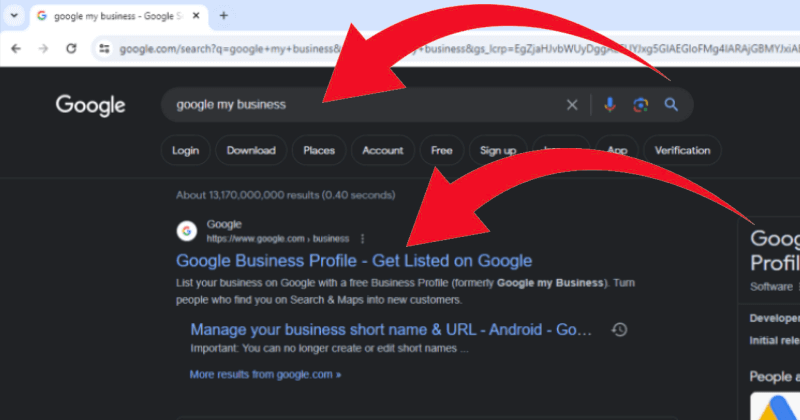
Write in Google.com "Google my business" and go to panel.
How to get reviews in Google My Business - step 2

Pick desired Google My Business profile.
How to get reviews in Google My Business - step 3

Go to "ask for review".
How to get reviews in Google My Business - step 4
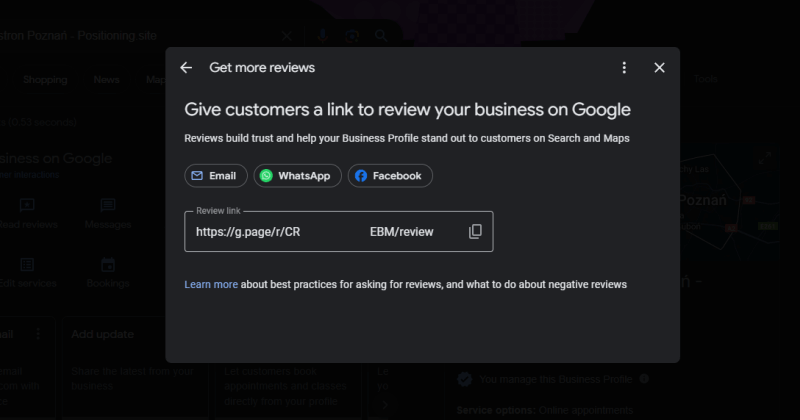
Copy the review link.
How to get reviews in Google My Business - step 5
Now you can convert the text link into a QR code. The QR code can be printed on labels, packaging, or on a plate — as in the graphic at the top of the page. For a deeper look at how to use QR codes in local marketing campaigns, see measuring the effectiveness of offline activities with QR codes. And if you want to see a real-world example of local marketing done well, read about local marketing with Fortuna brewery.